
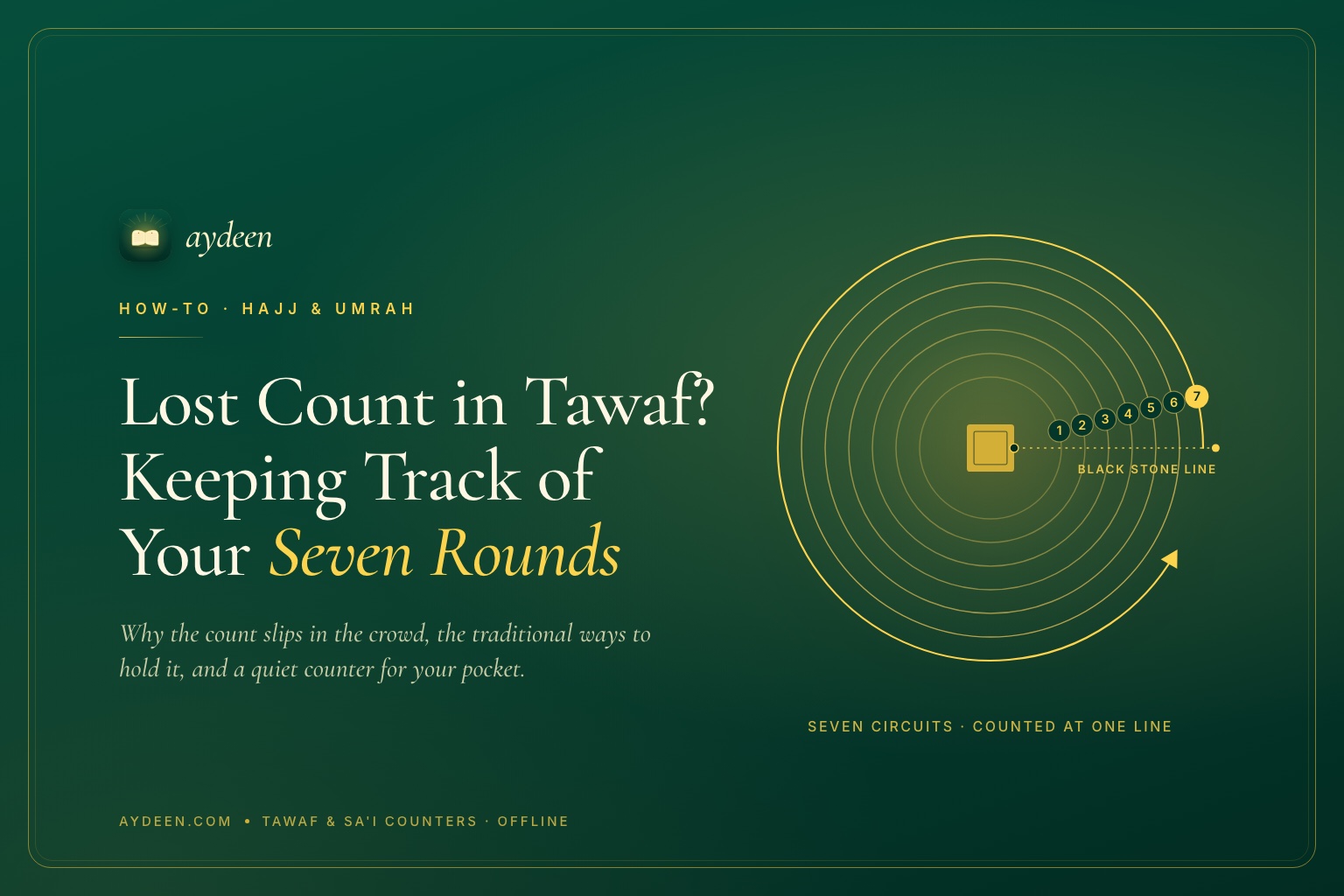
Losing count in Tawaf is a very human slip: seven circuits sound simple until you're shoulder to shoulder in the mataf, making du'a and keeping an eye on a parent. Tawaf is seven counter-clockwise circuits of the Kaaba, each beginning and ending at the Black Stone. Sa'i is seven trips between Safa and Marwa, starting at Safa and ending at Marwa. The fix is less about memory and more about method. Decide how you'll count before you start, mark each round at the same point, and let something outside your head — beads, a clicker or a tawaf counter on your phone — hold the number. And if you're truly unsure part-way through, ask your group's scholar.
Why counting slips in a crowded mataf
The mataf, the open area around the Kaaba, is one of the busiest places a person will ever walk. Several things work against your count at once:
- Your attention is rightly elsewhere. You're making du'a, reciting, perhaps in tears — counting is the last thing on your mind.
- The start line is easy to miss. Each circuit begins and ends in line with the Black Stone corner. In a thick crowd, when you can't see the corner itself, you can pass it without noticing.
- You're looking after someone. Holding a parent's arm or keeping a child close breaks the rhythm of counting.
- You're tired. Many pilgrims begin Tawaf soon after a long journey, and small numbers blur.
- Two people, two counts. Companions counting separately can finish on different numbers, and debating it mid-flow helps no one.
Traditional ways to keep count
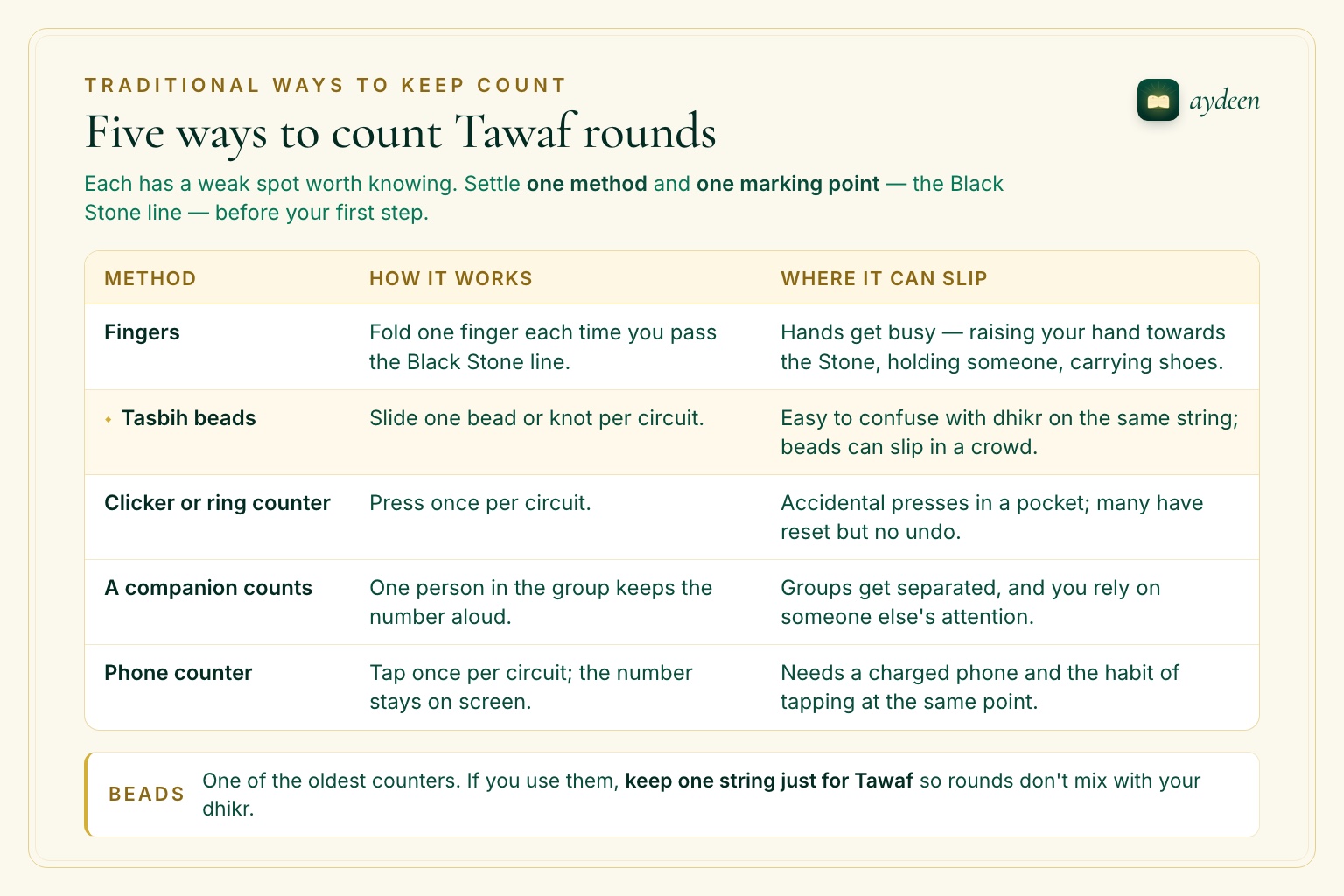
Pilgrims have always used simple aids. Each has a weak spot worth knowing.
| Method | How it works | Where it can slip |
|---|---|---|
| Fingers | Fold one finger each time you pass the Black Stone line. | Hands get busy — raising your hand towards the Stone, holding someone, carrying shoes. |
| Tasbih beads | Slide one bead or knot per circuit. | Easy to confuse with dhikr on the same string; beads can slip in a crowd. |
| Clicker or ring counter | Press once per circuit. | Accidental presses in a pocket; many have reset but no undo. |
| A companion counts | One person in the group keeps the number aloud. | Groups get separated, and you rely on someone else's attention. |
| Phone counter | Tap once per circuit; the number stays on screen. | Needs a charged phone and the habit of tapping at the same point. |
Good to know
Whatever you use, settle two things before your first step: one method, and one marking point — the Black Stone line — where you always count. Consistency matters more than the tool.
If you're genuinely unsure of your count
Sometimes, despite everything, you honestly don't know whether you've done five circuits or six. What to do then is a fiqh question. Scholars have addressed it, and the answer can depend on your circumstances, so it deserves a proper answer rather than a guess from a blog or an app.
Not a ruling
This is a general overview, not a fatwa. If you are unsure of your count, ask your group's scholar or a qualified scholar you trust before deciding how to continue.
A few practical things make that conversation easier:
- Move gently to the edge of the flow rather than stopping in the middle of it.
- Note the last number you're certain of, and roughly where you lost track.
- If you're travelling with a group, ask your guide or the scholar with you — that's part of what they're there for.
- Next time, count with something outside your head. Prevention is kinder than repair.
Using Aydeen's Tawaf counter, step by step
We built the Tawaf counter in Aydeen for exactly this moment: a big number, one tap per circuit, and nothing to read. You'll find it in the Tools tab under Hajj & Umrah, next to the Sa'i counter and the offline ritual guides. The Hajj shortcut on the Home screen opens the Hajj & Umrah screen, which has them too.
Open it before you reach the mataf
Go to Tools and, under Hajj & Umrah, tap Tawaf. Then tap Start (0 / 7) before your first circuit. Doing this at the edge, not in the crowd, leaves you only one thing to do per round: tap.
Tap once each time you complete a circuit
Tap anywhere on the screen, or the Round button, as you come back level with the Black Stone. Each tap gives a short vibration, so you can feel it registered without looking. A large number and a progress bar show where you are.
Mis-tapped? Use Undo
Someone bumps your hand; it happens. Undo takes the count back by one. Reset clears everything, but asks you to confirm first, so a count is hard to wipe by accident.
Put the phone away between rounds
The count is saved on your phone after every tap. If the app closes, the phone runs low on memory or you switch on airplane mode, the number is still there when you reopen it. It needs no connection at all.
Finish at seven
After the seventh tap the counter stops adding and shows All 7 rounds complete, with a short reminder of what usually follows: two rak'ahs behind Maqam Ibrahim, then Zamzam if you're able.
The Sa'i counter: Safa and Marwa, seven trips
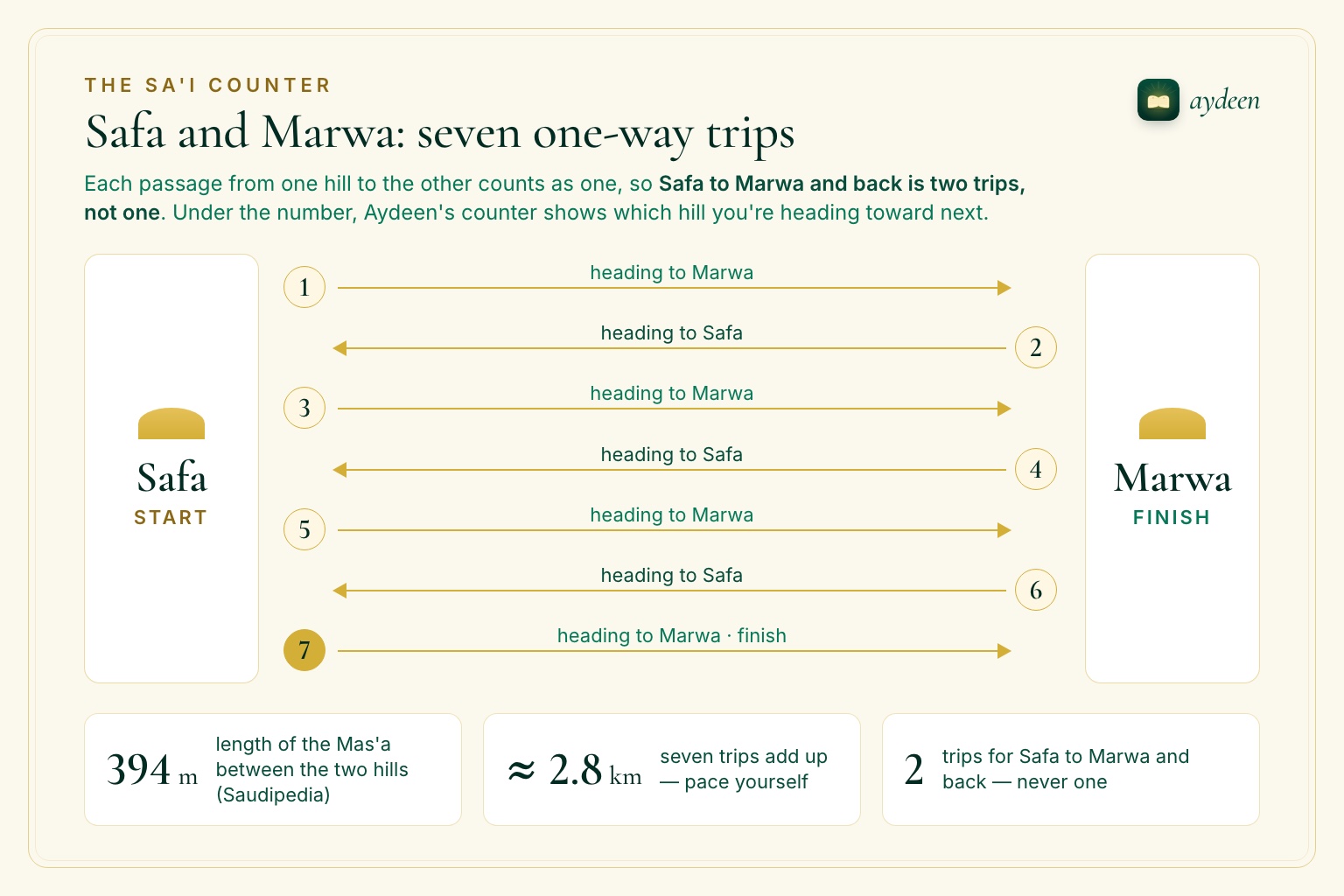
Sa'i has its own counting trap. The Ministry of Hajj's guide to Tawaf and Sa'y describes it as beginning at Safa and ending at Marwa, with each passage from one hill to the other counting as one. So Safa to Marwa and back is two trips, not one, and your seventh trip finishes at Marwa. It's also a long walk: Saudipedia, published by Saudi Arabia's Ministry of Media, gives the length of the Mas'a between the two hills as 394 metres, so seven trips come to nearly 2.8 km.
Aydeen's Sa'i counter uses the same one-tap design, with one addition aimed at that trap: under the number it shows which hill you're heading toward next — Marwa after you start, then Safa, then Marwa again. If the screen says Safa and you're walking toward Marwa, you'll notice before it matters.
The two counters are kept separately, so finishing your Tawaf and moving on to Sa'i doesn't disturb either count. Each holds one session at a time; reset it when you're done.
Before your first round
- Charge your phone, or carry a power bankA counter on a flat battery is no counter. Our Umrah packing list covers the rest of what to bring.
- Start the counter at the edgeTap Start before you step into the flow, not in the middle of it.
- Pick your marking pointThe Black Stone line for Tawaf; arriving at each hill for Sa'i.
- Agree who countsIn a group, one person keeps the count and the others follow.
- Check the next prayer timeSo a congregational prayer doesn't catch you mid-round. Times can differ between apps — here's why Fajr and Isha vary.
- Silence notificationsDo Not Disturb stops messages pulling your eyes to the screen.
Staying present, with the phone as a quiet aid
A counter should take the job off your mind, not add a new one. A few habits help:
- Hold it, don't watch it. The whole screen is the button and every tap vibrates, so you can count without looking down.
- Keep your eyes up. The mataf moves. Walking with your head in a phone isn't safe for you or the people around you.
Let the phone hold the number, so your heart is free for the du'a.
Honest limits
- It counts taps, not steps. There's no GPS or motion tracking. If you forget to tap, the counter can't know.
- One session per counter. Tawaf and Sa'i each hold one count at a time.
- It doesn't settle doubts. If you're unsure whether a tap was right, that's a question for a scholar, not for an app. Aydeen doesn't rule on, or validate, anyone's Umrah or Hajj.
- The ritual guides are an overview. Aydeen's step-by-step Umrah and Hajj guides haven't yet been reviewed by a scholar. Where they differ from your group's scholar, follow your scholar.
- Ads on the free tier. Some screens show non-personalised, G-rated banner ads; Premium removes them (from $6.99/month in the US — see in-app for your local price).
Frequently asked questions
How many rounds are there in Tawaf?
Seven. The Ministry of Hajj's guide describes seven counter-clockwise circuits of the Kaaba, keeping it on your left, with each circuit starting and ending at the Black Stone.
Is Safa to Marwa and back one lap or two?
Two. Each passage from one hill to the other counts as one trip. You begin at Safa, and after seven trips you finish at Marwa.
What should I do if I lose count during Tawaf?
Step to the edge of the crowd, note the last number you are certain of, and ask your group's scholar or a qualified scholar you trust how to continue. We don't give rulings, and the app doesn't either.
Does Aydeen's Tawaf counter work without internet?
Yes. The count is saved on your phone after every tap, so it needs no connection and survives the app closing or airplane mode. The same is true of the Sa'i counter.
May Allah accept your Umrah. If something would make counting easier for you or your parents, we'd love to hear it. Email [email protected] — we read everything.