
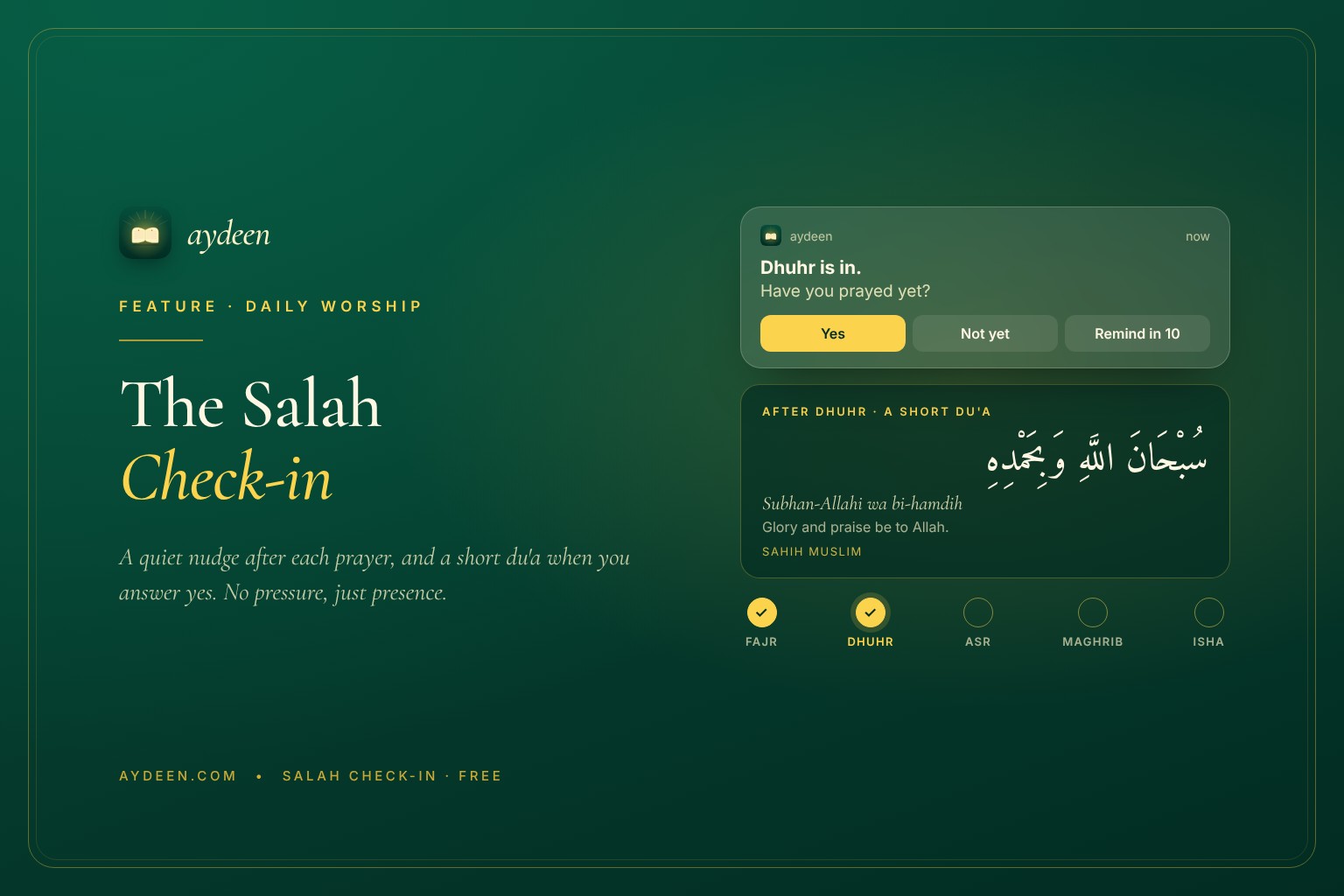
Most prayer apps stop at the adhan. They tell you it's time, and that's the end of it. But the hard part is rarely knowing the time. It's the moment ten minutes later, when the day has pulled you back in. Aydeen's Salah check-in is built for that moment. It's one quiet question after each prayer begins, with no sound, no vibration and no guilt: "Have you prayed yet?" If you have, it's counted, and a short du'a can follow. If you haven't, the reply is simple: "No worries. The door is always open."
Why a check-in, not another alarm
Muhasabah, taking honest account of yourself, is an old practice. A check-in is a small, daily version of it. We designed it around a few rules:
- Quiet by design. The notification makes no sound and doesn't vibrate. It's there when you look, and it never demands to be looked at.
- "Not yet" is a real answer. There are no red marks, no shaming and no leaderboard.
- Private. Your check-ins are for your own reflection. Aydeen never shares them.
- Free. In the app's own words: "The check-in itself is, and will always be, free."
How the Salah check-in works, step by step
Turn it on
You're offered the check-in during setup ("A quiet nudge at each salah. No pressure, just presence."). To change it later, open More → Salah check-in and pick a mode. Off sends nothing. Gentle, the default, sends one soft check-in per prayer. Persistent adds one more nudge 30 minutes before the next prayer, unless you've already said Yes.
Choose when it asks
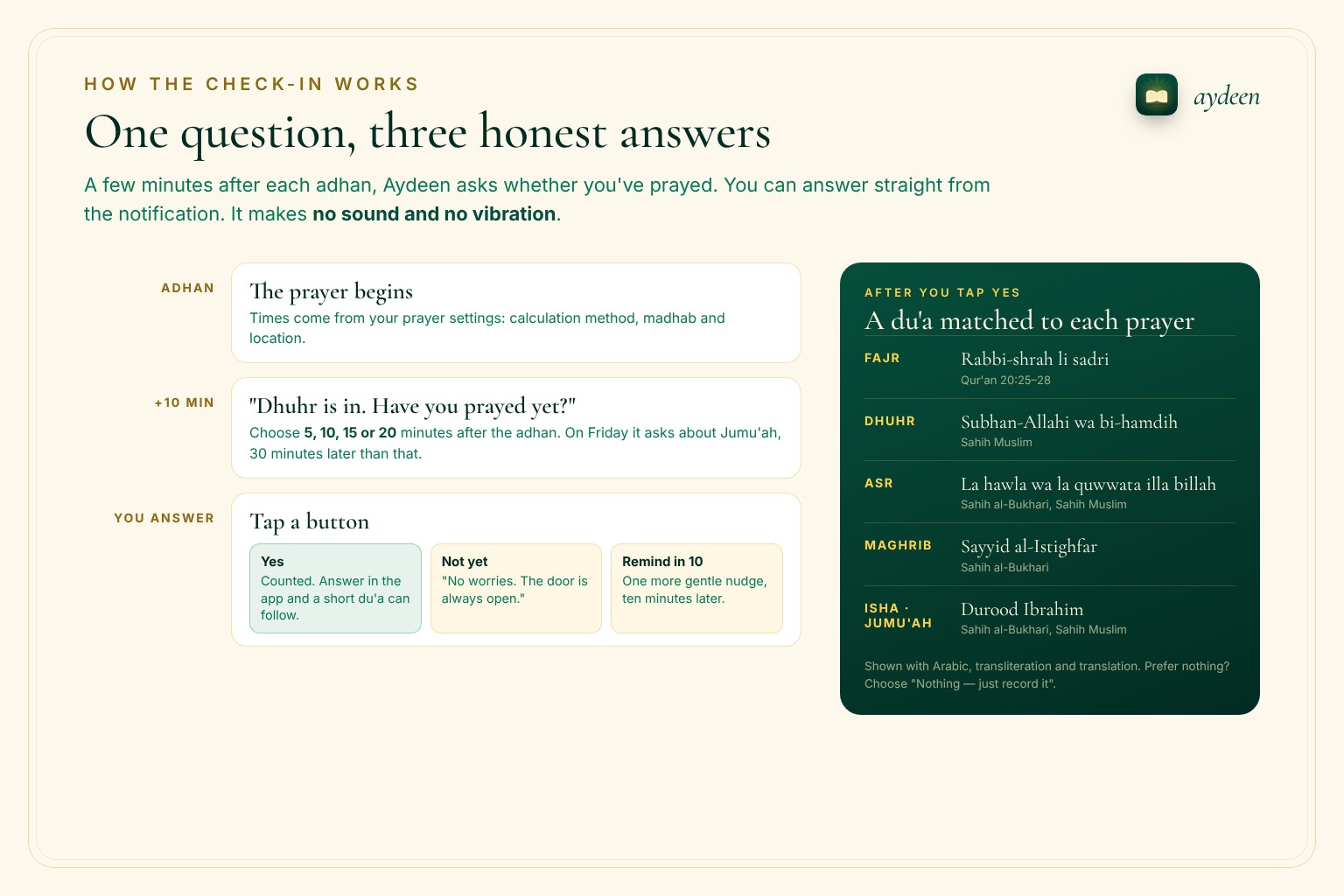
Under Send the nudge, pick 5, 10, 15 or 20 minutes after the adhan. On Fridays the Dhuhr check-in becomes Jumu'ah ("Jumu'ah Mubarak. Have you prayed yet?") and arrives 30 minutes later than your usual timing, to leave room for the khutbah. You can switch individual prayers off too, which helps if you sleep through the Fajr window.
Answer from the notification
Yes counts the prayer. Not yet simply records that. Remind in 10 brings back one more gentle nudge ten minutes later. None of them open the app.
Take a micro-moment
When you tap Yes inside the app, you'll see "Dhuhr counted. May Allah accept it." (with the prayer you just marked). Under After you tap Yes you choose what follows: a Short dua (the default), the tasbeeh counter, or Nothing — just record it.
A du'a for each prayer
The short du'a after each prayer is chosen ahead of time, so the evening's du'a is always the evening's. Each one appears in Arabic with a transliteration, an English translation and its source:
| Prayer | Du'a | Source |
|---|---|---|
| Fajr | Rabbi-shrah li sadri, wa yassir li amri… "My Lord, expand for me my breast, ease for me my task…" | Qur'an 20:25–28 |
| Dhuhr | Subhan-Allahi wa bi-hamdih "Glory and praise be to Allah." | Sahih Muslim |
| Asr | La hawla wa la quwwata illa billah "There is no might nor power except with Allah." | Sahih al-Bukhari, Sahih Muslim |
| Maghrib | Sayyid al-Istighfar, the "master" supplication for forgiveness | Sahih al-Bukhari |
| Isha & Jumu'ah | Durood Ibrahim, sending blessings on the Prophet ﷺ | Sahih al-Bukhari, Sahih Muslim |
رَبِّ اشْرَحْ لِي صَدْرِي وَيَسِّرْ لِي أَمْرِي
"My Lord, expand for me my breast, and ease for me my task."
Qur'an 20:25–26 — the opening of the Fajr du'aThe iman check-in: "How connected do you feel to your deen today?"
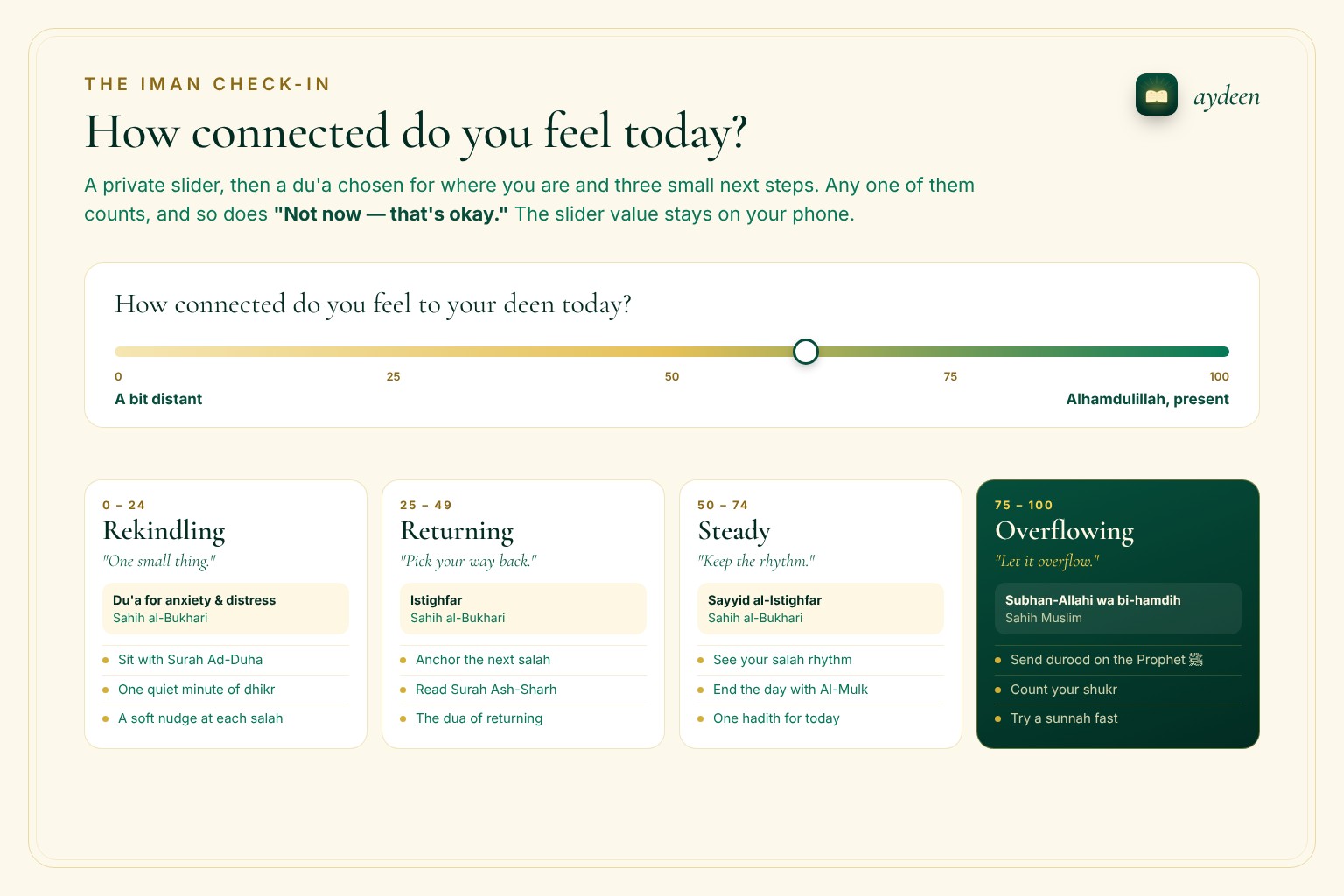
Prayer is one part of the picture. The heart is another. Each day the Home screen offers a small card, How is your iman today?, which you can answer or dismiss until tomorrow. Tap Check in and you get a single private slider, from "A bit distant" to "Alhamdulillah, present". There's no right answer. Where you land picks one of four gentle responses. Each comes with a du'a and three small next steps, and "Not now — that's okay" is always one of the choices.
| Slider | Response | Du'a | Next steps offered |
|---|---|---|---|
| 0–24 | Rekindling "One small thing." | Du'a for anxiety & distress (Bukhari) | Sit with Surah Ad-Duha · one quiet minute of dhikr · a soft nudge at each salah |
| 25–49 | Returning "Pick your way back." | Istighfar (Bukhari) | Anchor the next salah · read Surah Ash-Sharh · the dua of returning |
| 50–74 | Steady "Keep the rhythm." | Sayyid al-Istighfar (Bukhari) | See your salah rhythm · end the day with Al-Mulk · one hadith for today |
| 75–100 | Overflowing "Let it overflow." | Subhan-Allahi wa bi-hamdih (Muslim) | Send durood on the Prophet ﷺ · count your shukr · try a sunnah fast |
Even strong hearts have quiet seasons. You opened the app today, and that already counts.
Evenings, streaks and a quiet pause
- A quiet moment to reflect. After Maghrib, the Home screen shows a short muhasabah card with how many prayers you've checked in today ("Tomorrow is fresh, in shaa Allah."). Open check-in takes you to today's list, where you can mark any prayer you've prayed or undo a mistake.
- Your day streak counts consecutive days with at least one prayer checked in. A Yes also ticks that prayer in Aydeen's Prayer tracker, so the two stay in step. (The Prayer tracker keeps its own streak, which needs all five prayers.)
- Quiet pause. Travelling, unwell, or just need space? Pause nudges for now for 3, 5, 7, 10 or 14 days. It freezes your streak rather than breaking it, and nudges resume on their own.
See your rhythm: check-in analytics
Open More → Analytics for a private look at your week. Everyone sees today's count, the day streak, a seven-day strip and "N check-ins this week". With Premium you can look back over 7, 30 or 90 days or a custom range, and see your longest streak, a breakdown by prayer, and a by-weekday view of the share of prayers you checked in. In the app's words, it's "Visible only to you. Never shared, never on a leaderboard."
Fasting, logged the same gentle way
The "Try a sunnah fast" step leads to Aydeen's fasting log, which is also under More → Fasting. Each day you can mark a fast as Ramadan, Voluntary or Qaza, then as completed or broken. The screen shows when Suhoor ends (Fajr) and Iftar (Maghrib) for your location, along with a 30-day strip. The free analytics include a Sunnah days count of the Monday and Thursday fasts you've completed. The log covers today only: there's no backdating, and it doesn't count how many qaza fasts you owe.
Not a ruling
The check-in is a personal reminder, not a measure of anyone's prayer. It doesn't record whether a prayer was on time, and it can't judge one. For questions about missed prayers or qaza, please ask a qualified scholar you trust.
Privacy and honest limits
- Stored on your phone. Check-ins, your streak, settings and fasts are kept on your device, and you don't need an account. They aren't backed up to the cloud yet, so they won't follow you to a new phone. The one exception: a Yes also ticks the Prayer tracker, and the tracker syncs to your account if you're signed in.
- Your iman answer stays put. The slider value is never sent to a server, and only your latest answer is kept. There's no mood history.
- It counts, it doesn't time. A check-in records whether you prayed, not when.
- Notifications are in English for now, even when the rest of the app is in another language.
- The du'as are from authentic sources but not yet scholar-reviewed. Hadith sources name the collection, not the hadith number.
- Fuller analytics are Premium. The check-in itself, the streak and the weekly view are free.
Frequently asked questions
Does the Salah check-in make a sound?
No. Check-in notifications are silent: no sound and no vibration. You see them when you look at your phone, and you can answer Yes, Not yet or Remind in 10 without opening the app.
When does the check-in arrive?
5, 10, 15 or 20 minutes after each adhan, whichever you choose (10 by default). On Fridays the Dhuhr check-in asks about Jumu'ah and arrives 30 minutes later than your usual timing.
Is my check-in data private?
Yes. Check-ins, your streak and your iman answer are stored on your phone and never shared. The iman slider value is never sent to a server. A Yes also ticks the Prayer tracker, which syncs to your account only if you're signed in.
Is the Salah check-in free?
Yes. The check-in, the du'as, the streak and the weekly view are free. Premium adds longer analytics ranges, your longest streak, and breakdowns by prayer and weekday.
May Allah accept our prayers and make them easy. If something about the check-in could be gentler, tell us at [email protected] — we read everything.