

Every prayer app can tell you when Asr begins. What it can't tell you is when the congregation at your local masjid actually stands for Asr. That time, the jamaah (or iqamah), is set by each masjid. It's usually printed on a board by the door or shared in a WhatsApp group, and it rarely makes it into an app. Aydeen's Nearby masjids puts the two side by side. It finds the masjids around you, shows each one's next jamaah where the community has reported it, and lets you add your own masjid's times so the next person doesn't have to guess.
"Begins" vs. "jamaah": why your app can't know your masjid's time
A prayer's start time is astronomy. It's worked out from the sun's position using a published calculation method, which is why apps can differ by a few minutes (we explain that in why prayer apps show different Fajr and Isha times). The jamaah time is a decision. A masjid might pray Dhuhr at 1:00 PM all winter, or hold two Jumu'ah khutbahs to fit everyone in. No formula can predict that. Only the people who pray there know it.
So Aydeen treats them separately. Start times are calculated on your phone, from your own prayer settings. Jamaah times come from the community, and they're marked as such wherever they appear.
How to find a masjid near you, step by step
Open Nearby masjids
On the Prayer tab, tap the Nearby masjids card ("Jamaah times at masjids near you"). It's also in the Tools tab, in the Prayer section.
Let it use your prayer-times location
It searches around the same location your prayer times use: your phone's location, or a place you've set by hand. If Aydeen doesn't have a location yet, you'll see Location needed with two choices: Use my location or Set location by hand.
Pick a distance
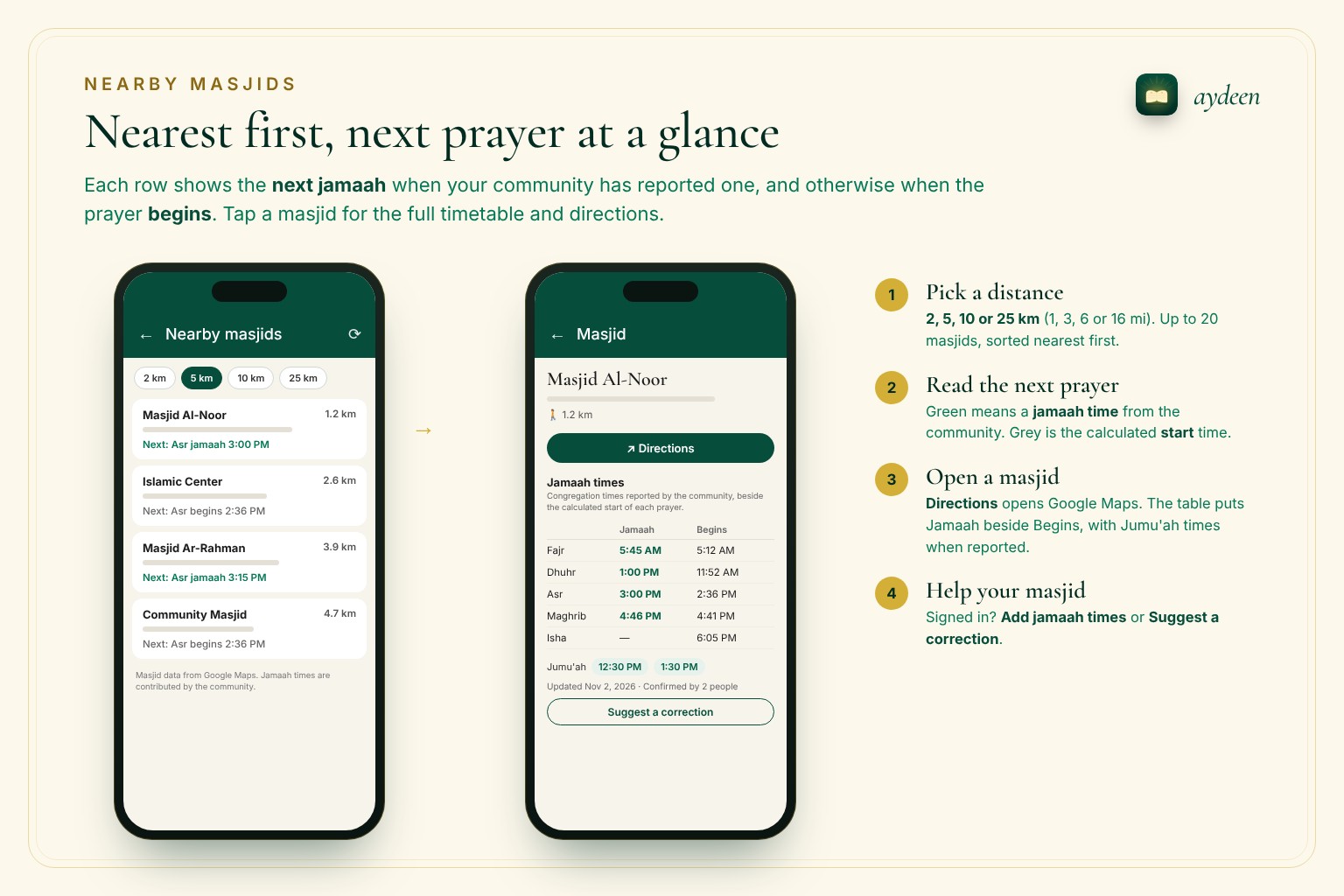
Choose 2, 5, 10 or 25 km. In miles, that's 1, 3, 6 or 16. It starts at 5 km. If nothing turns up, Widen search steps out to the next distance for you.
Scan the list
Masjids are sorted nearest first, each with its address and distance. Under each one, a "Next:" line reads either Next: Asr jamaah 3:00 PM (a community time, in green) or Next: Asr begins 2:36 PM (the calculated start).
Open a masjid, then go
Tap a masjid for its full timetable. Directions opens Google Maps, in the app if you have it or in your browser if you don't, with the masjid already set as your destination.
What a masjid's page shows
The masjid page leads with its name, address and distance, then the Jamaah times table. Each of the five daily prayers has two columns:
- Jamaah is the congregation time the community has reported, or "—" if nobody has reported one yet.
- Begins is the calculated start time, using your own calculation method and madhab. Your personal minute adjustments aren't applied here, because the masjid's timetable doesn't follow them.
When they've been reported, Jumu'ah times appear underneath, one for each khutbah the masjid holds. Below them you'll see when the timetable was last updated and how many people have confirmed it. If nobody has added times yet, the page says so plainly: "No jamaah times reported for this masjid yet. The times shown are calculated prayer start times."
Add your masjid's jamaah times
This is where you come in. If you know your masjid's timetable, adding it takes about a minute, and it helps everyone who searches after you.
- Open the masjid and tap Add jamaah times. If times are already there, the button reads Suggest a correction.
- Sign in if asked. Reading times never needs an account, but contributing does, for a reason we explain below.
- Set a time for each prayer you know, and leave the rest blank. Each one shows the calculated start ("Begins …") as a guide.
- For Jumu'ah, add each khutbah sitting the masjid holds.
- Add an optional note (up to 160 characters), such as "Ramadan timings differ", then tap Submit.
Good to know
Copy the times exactly as the masjid publishes them, from the board or the masjid's own timetable. Agreement is checked slot by slot (more on that next), so an exact copy is what gets your masjid's times published.
How jamaah times go public: two people, the same timetable
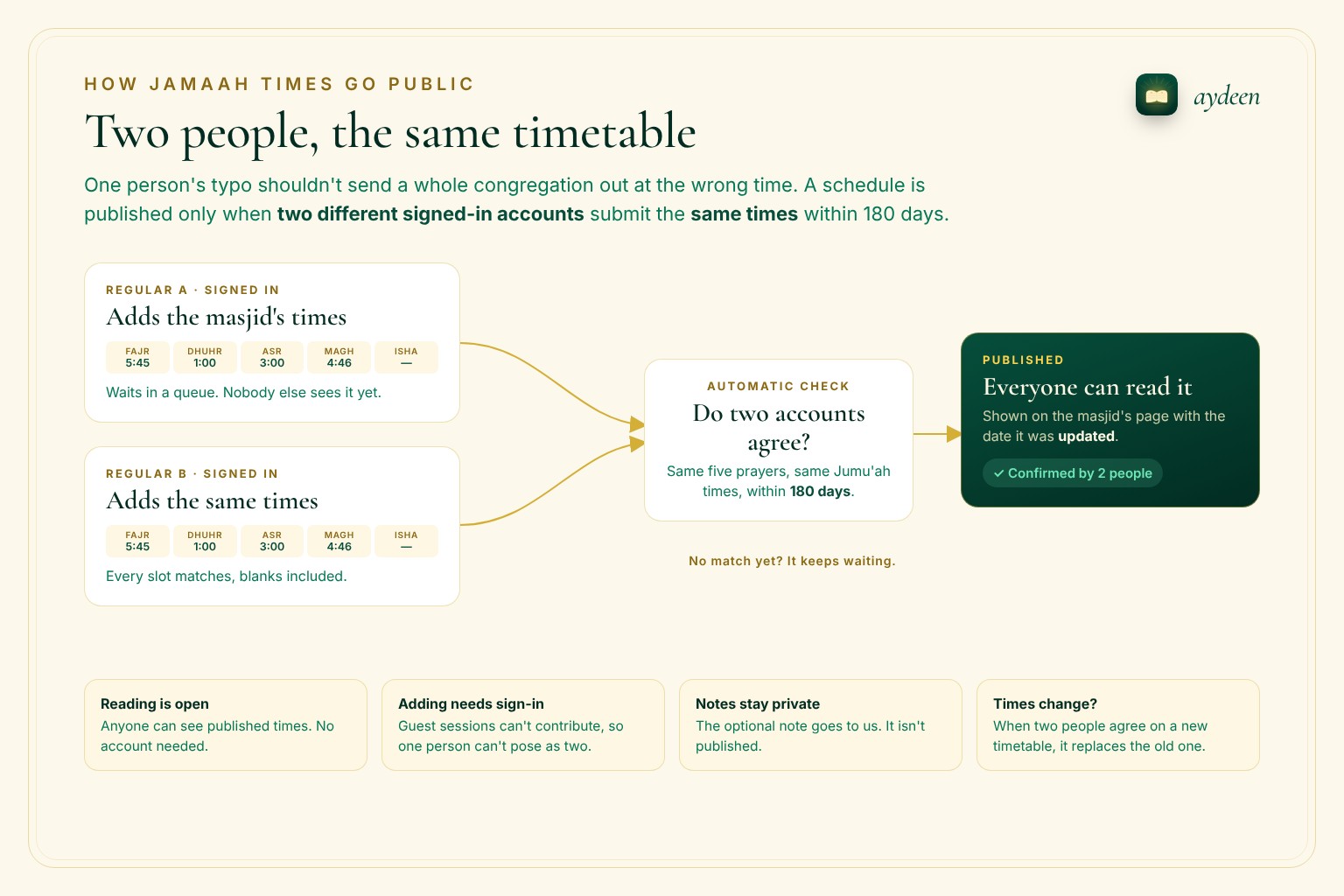
People leave the house for these times, so one person's typo (or one person's prank) shouldn't reach a whole congregation. Here's the rule Aydeen follows. A masjid's timetable is published automatically once two different signed-in accounts have submitted the same schedule within 180 days. "The same" means every slot matches: all five prayers, blanks included, plus every Jumu'ah time.
- Until then, it waits. A first submission sits in a queue that other users can't see.
- Guest sessions can't contribute. Requiring a real account stops one person from posing as two.
- Notes aren't published. Your note comes to us; it isn't shown to other users.
- Timetables can change. When two people agree on a new schedule, it replaces the old one and the "updated" date moves forward. The 180-day window keeps old reports from bringing back a timetable the masjid has since changed.
Two regulars and one minute each, and every Aydeen user near your masjid knows when to leave the house.
Miles or kilometres?
Distances follow your region automatically. Phones set to the United States, the United Kingdom, Liberia or Myanmar see miles and feet; everyone else sees kilometres and metres. To change it, go to Settings → Distance and choose Automatic, Kilometres or Miles. Distances are measured in a straight line from your location, so a walking or driving route will usually be a little longer.
Your location and privacy
- The search goes to Google. To find masjids, your phone sends your search location straight to Google's Places service. Aydeen's own servers don't receive it.
- Results are saved on your phone for 30 days for that area, so the list opens instantly and still works offline. You'll see "Showing saved results — you appear to be offline." Pull down or tap Refresh to fetch a fresh list.
- Jamaah lookups send only the masjids' IDs, never your location.
- Reading never needs an account. You only sign in if you want to contribute.
Honest limits
- Up to 20 masjids per search. Google picks the 20 most prominent places in range, then Aydeen sorts them by distance. In a dense city, a small nearby musalla can miss the cut. If that happens, try a smaller distance.
- If Google Maps doesn't list it, neither do we. A masjid that's missing or tagged wrongly on Google Maps won't appear correctly here.
- Most masjids start without jamaah times. Until two people add them, you'll see calculated start times.
- Times change. Ramadan, seasonal timetables and special events all move jamaah times. Always confirm with the masjid.
- Not a full directory. There's no map view, opening hours, phone numbers or photos, and you can't search by name.
- Ads on the free tier. The masjid list shows a non-personalised, G-rated banner ad; Premium removes it (from $6.99/month in the US — see in-app for your local price).
Frequently asked questions
Why doesn't my masjid appear in the list?
Aydeen shows up to 20 masjids per search, chosen by Google Maps as the most prominent in range and then sorted by distance. Try a smaller distance so fewer places compete. If the masjid isn't listed as a mosque on Google Maps, it won't appear in Aydeen either.
How are jamaah times checked before they're shown?
A masjid's timetable is published only when two different signed-in accounts submit exactly the same schedule (all five prayers, blanks included, plus Jumu'ah) within 180 days. Until then, a submission waits privately.
Do I need an account to see jamaah times?
No. Anyone can read published jamaah times. You only need to sign in to add times or suggest a correction.
Can I see distances in miles?
Yes. Distances follow your phone's region automatically: miles in the United States, the United Kingdom, Liberia and Myanmar, and kilometres elsewhere. You can change it in Settings, under Distance.
May Allah fill our masjids. If your masjid's details look wrong, or you'd like help getting its times in, email [email protected] — we read everything.